Software release 4.1
Pickit 4.1 brings Vision-Language Models (VLMs) to 3D robot vision in real industrial environments. This release introduces several new features and application licenses designed to make automation smarter, easier, and more flexible.
AI background filter: Automatically removes background regions not relevant to object detection.
AI segmentation: Identifies entire categories of objects using simple text prompts, for model-free object detection.
Flex Depal: The new default detection engine for the Pickit Depal application can perform mixed and unmixed depalletizing of items like boxes and bags with minimal configuration.
Pickit Place application: A new application for filling a container with parts, placing each part in a suitable empty space.
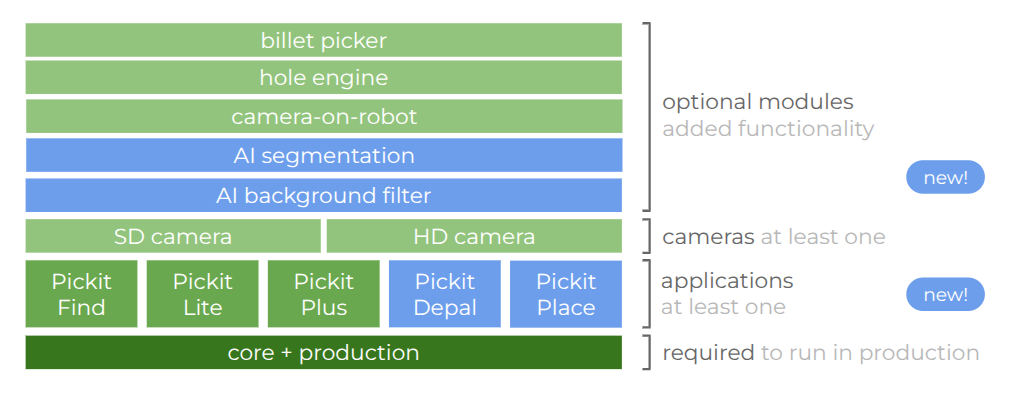
AI-powered features
AI Background Filter
The AI background filter uses a VLM to remove background regions not relevant to object detection. For example, it can be used to remove supporting surfaces like pallets, or containers with varying or uneven shape such as slanted/deformed bins, and plastic-lined bins. This filter simplifies application setup, improves detectability and reduces false positives.

AI segmentation
This new VLM-powered feature allows existing detection engines like Pickit Flex to identify entire categories of objects using simple text prompts, eliminating the need for geometric modeling or CAD files for every SKU. This enables a whole new range of applications handling a high-mix of SKUs with a single configuration.

Simplified configuration: This model-free approach saves engineering teams significant time. A single configuration covers an entire category, even one with hundreds of SKUs.
Handling variability: The system suits logistics and e-commerce environments, where new packaging arrives daily and cannot be modeled in advance.
Accessibility: Configuring vision tasks no longer requires vision experts; you describe them in plain English.
Flex Depal
This new AI-based engine uses prompts to reliably detect boxes, bags and other palletizable items in any scenario, including mixed-box configurations. It is the new default detection engine for the Pickit Depal application.

Pickit Place application
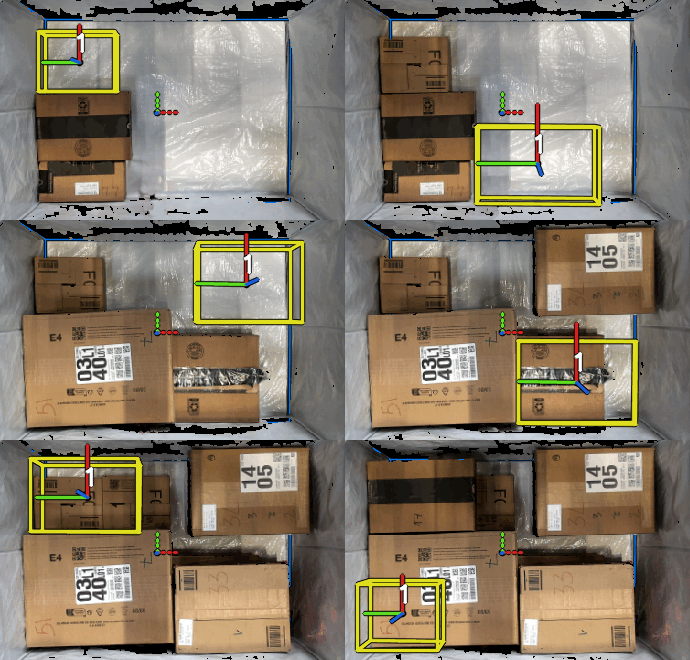
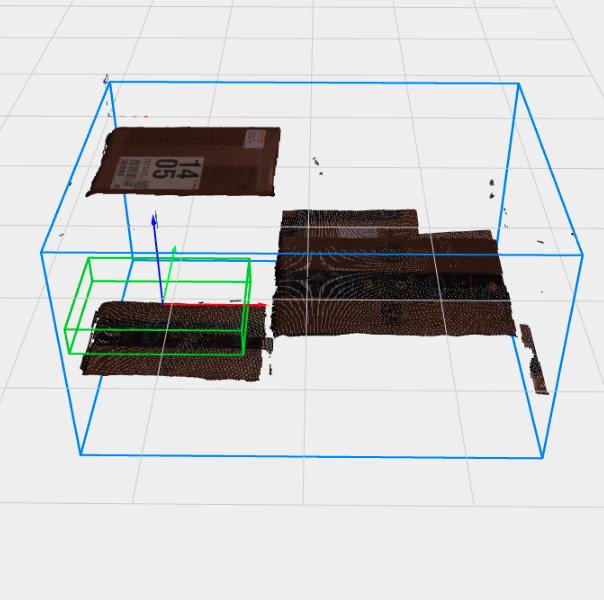
We are introducing a new application for filling a container with parts: Pickit Place. It scans the scene and selects a suitable placement for a part with known dimensions by applying a similar logic as a human operator would:
prefer filling the container from the bottom,
prefer more stable place locations (with more supporting surface),
prefer placements touching neighboring items or the container.
Other improvements
Repeatability test
The Detect button of the web interface has a new option to quickly assess the repeatability of detections by running a number of detection runs and analyzing the statistics of the results, such as the success rate and the mean/max position and orientation errors (learn more).

Date and time management
The system settings page now lets you sync the processor clock with an online time source and change the timezone. You can set the timezone of your choice to keep your logs and snapshots aligned with your factory’s local time.
Note
At Pickit, we strive to provide a transition between Pickit versions that is as smooth as possible. However, sometimes a manual user action is required. When upgrading from 4.0, the processor timezone is set to UTC. This will be applied on the timestamps in the web interface logs and downloaded log files. To use your local timezone instead, update it in the System date & time settings.

Visionerf camera: new 6 MP cropped image size
Visionerf cameras now offer a new “6 MP cropped” image size, providing maximum sensor density over a reduced central field of view. This is useful when the region of interest is smaller than the full camera field of view and higher resolution is needed for applications like quality control. This provides the highest pixel density ever supported by our cameras.

SD2 camera: new exposure settings
The SD2 camera now has the Infrared (IR) exposure as an advanced setting, enabling improved image captures in darker regions.
Zivid camera: faster loading
We optimized the loading of Zivid camera settings obtaining +100ms speedup when switching Pickit configurations that preserve the camera settings.
Upgrade now!
By introducing flexible, prompt-based detection, Pickit 4.1 lets automation engineers deploy systems faster and more reliably, whether in unstructured scenes or for highly variable part picking. If your Pickit upgrades license is active, you can download the new release here. Otherwise, contact our sales team at sales@pickit3d.com!
Note
These AI features require the standard or high performance processor, which includes a dedicated GPU.