The Pickit license system
The Pickit hardware and software can be tailored to the needs of your application. Since version 3.0, Pickit offers a licensing system that allows you to get what you need, without having to pay extra for features you won’t be using. You typically start from the application you want to solve, and opt in to optional features like an HD camera or the AI background filter. Or, you can opt-out of production-specific features if you’re an educational or non-profit organization.
Note
In the system settings you can inspect the details of the installed licenses, as well as learn about available extensions. To install a new license file, follow these steps.
You can also check the installed licenses of your Pickit system at a glance in the top bar of the Pickit web interface.
A Pickit license file contains a combination of modules that define the functionality of your Pickit system. The following modules are available:
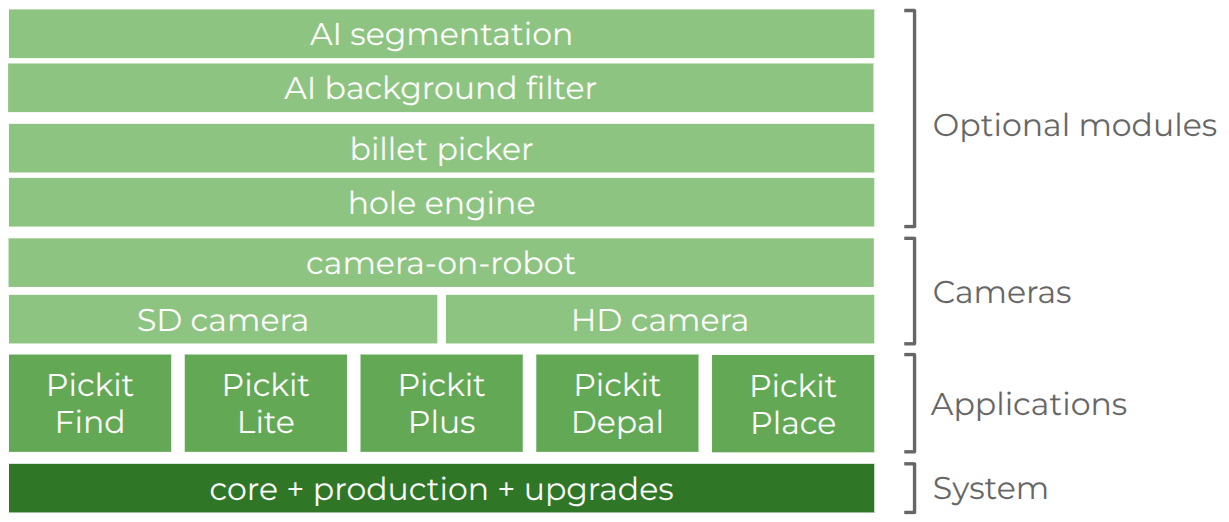
System modules:
Core: Enables detections with a live camera.
Production: Enables unlimited communication between the robot and Pickit. Systems without this module (e.g. for educational or non-profit organizations) cannot perform long-running production rounds without human intervention.
Pickit upgrades: Enables software upgrades for a specified period of time, and up to a given Pickit version.
Application modules, include features for solving specific types of applications:
Pickit Find: For part location applications.
Pickit Lite: For semi-structured picking applications.
Pickit Depal: For depalletization applications.
Pickit Plus: For random bin picking applications.
Pickit Place: For container filling applications.
For applications that don’t fit neatly into one of the above categories, or combinations of them, there also exists the Pickit All-in-one license that exposes all available features.
Camera modules:
SD camera: Enables the use of standard-definition cameras.
HD camera: Enables the use of high-definition cameras.
Camera on robot: Enables the use of a robot-mounted camera.
The SD camera and HD camera modules control not only which camera types are allowed but also the maximum number of cameras that the system can use. To use multiple cameras of the same type (e.g., two SD cameras), you need the corresponding license module that supports at least that number of cameras.
Optional modules for extending functionality:
AI segmentation: Enables AI-based segmentation for clustering objects apart in detection engines like Pickit Flex.
AI background filter: Enables AI-based removal of background regions not relevant to object detection.
Hole engine: Enables the use of the hole detection engine for detecting circular holes of known size on a surface.
Billet picker: Enables the use of the billet picker (patent pending).
Note
Spare processors that don’t have a license file installed are not able to run detections on a live camera, but can be used for inspecting snapshots and configuration files.
Pickit allows loading snapshots that use features not supported by your installed license modules. This allows you to preview what expanding Pickit’s functionality could bring to your application. For instance, a system without an HD camera license module can load and run detections on snapshots taken with an HD camera.
If you want to learn more about Pickit licenses, and how to expand the functionality of your current Pickit system, please contact us at sales@pickit3d.com.