Warning
You are reading the documentation for an older Pickit release (4.0). Documentation for the latest release (4.1) can be found here.
Pickit system software upgrades
Upgrading the Pickit software can be done by the user, without Pickit support engineers’ intervention. This guide will take you through the upgrade procedure.
Note
Pickit 3.x users
There is no direct software upgrade path from Pickit 3.x to Pickit 4.x. If you have a Pickit 3.x system and want to upgrade to Pickit 4.x, an intervention from our support team is required. Please contact us at support@pickit3d.com to learn more.
If you have a Pickit 3.x system and want to upgrade to the latest Pickit 3.5 patch release, select your Pickit version in the bottom of the left panel and follow the instructions there.
The requirements are:
A valid Pickit Upgrades license module within its support period.
The latest Pickit upgrade bundle, downloadable here.
Pickit does not require internet access during software upgrades. You can download the upgrade bundle in an external computer first and install it later.
Overview
To upgrade your system follow these steps:
Navigate to the Settings section of the Pickit web interface, then
System settings > Upgrade Pickit version.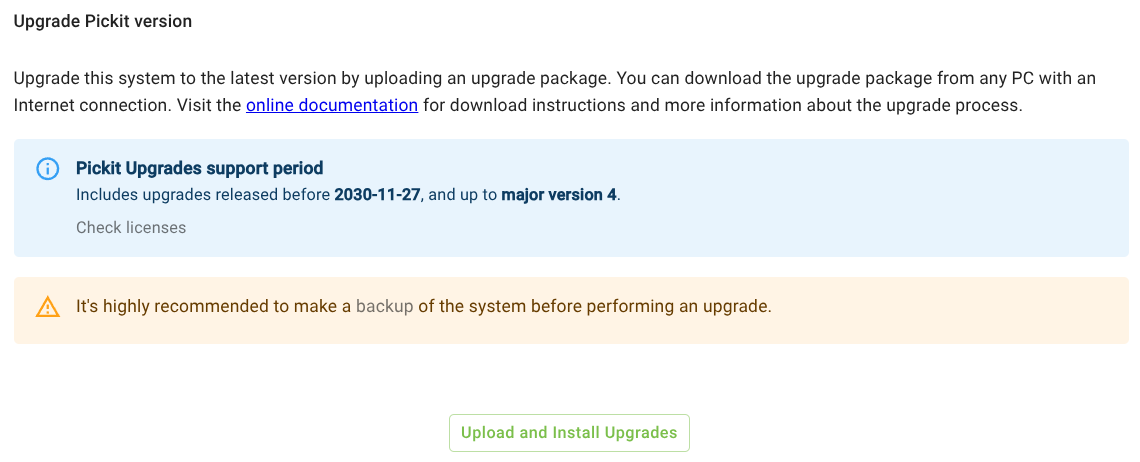
Confirm that your Pickit Upgrades license module is valid and within its support period, as shown above. If your license has expired, please contact us at sales@pickit3d.com to renew it.
Make a backup of your configuration files.
Click
Upload and Install Upgradesand provide the Pickit upgrade bundle you downloaded previously.The upgrade process is self-explanatory. In case it’s unsuccessful, an informative message with the cause and action to take will be displayed.
Note
HD cameras
A Pickit software upgrade might trigger an update of the firmware running on your HD camera. The firmware upgrade takes place the next time your camera is detected by the Pickit system. If the camera is already connected, this will be immediately after the Pickit software upgrade, when the system reboots. Otherwise, it will be the next time the HD camera is connected to the Pickit system. To guarantee camera power stability during the camera firmware upgrade, it is recommended to use the standard power supply provided with the HD camera.